


There is nothing more exciting than buying a domain. Whoop! It’s the start of an exciting new online adventure and all you want to do is dive into making everything in your business look LEGIT.
You want the slick website, the matching email for your domain and of course you want it all to be easy and super secure.
You buy your domain from a hosting company and they’re offering you the world – web hosting, email, domain protection, a website builder all wrapped up in a nice neat package. Why not just say yes to everything?
The problem is that big companies selling domain names cheap can’t be good at everything. But they sure do want your dollars, even if their other products aren’t a great fit for you.
Still I can’t begrudge them trying to upsell you, but I can help you make an informed decision about your hosting.
Let’s start with the basics.
Domain Hosting vs Web Hosting
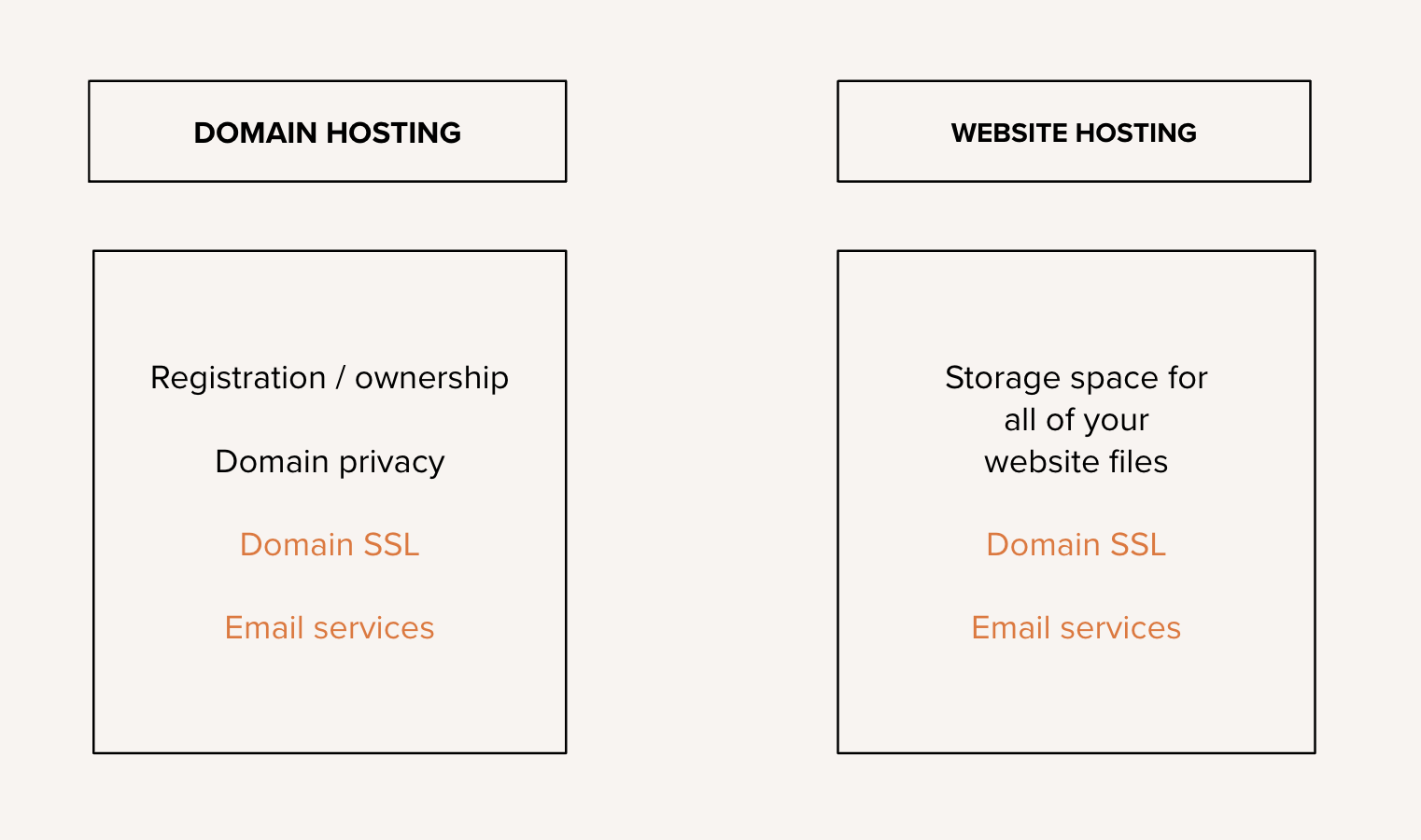
When you buy from some of the other bigger hosting companies (like GoDaddy or BlueHost) it’s easy to assume that domain and website hosting are the same thing, but actually they perform very different functions.
DOMAIN HOSTING
When you buy a domain name from a domain reseller, they are simply the storefront, allowing you to register your ownership. Your details are then lodged in one of several worldwide domain registries so that you can prove legal ownership. The reseller (eg. GoDaddy) is simply handling the transaction and offering basic data handling and protecting services plus keeping a little commission.
Where they really make their money is by offering additional services, like email accounts and space to store them and security certificates for your website. And of course they will try to upsell you web hosting too but that’s an entirely different service.
WEB HOSTING
This brings us neatly to web hosting. Web hosting is online storage for your actual website files. It usually includes a control panel, giving you the ability to access and control those files and the programs and scripts which they are made up of. Typical functions include file management, databases, php version control (WordPress is mostly composed of php files), app installation (like WordPress) and security and backup features.
Web hosting can be purchased entirely separately from domain hosting and actually there are some good reasons for purchasing from an entirely different company.
As I mentioned before, most companies that sell cheap domains don’t always offer great quality hosting and personally, I prefer to use a specialist hosting company.
But the main reason to shop elsewhere is that it’s good practice not to put all of your hosting eggs in one basket. From personal experience, I can tell you that sometimes hosting companies have system failures, which means that your website could be out of action for a number of days. If you have a good independent backup system and separate access to your domain name, then you can move hosts and be up and running almost immediately. (Though I must stress that would be an incredibly rare situation).
Connecting Your Domain to Your Web Hosting
So, you’ve bought your domain name and chosen a web host…but how do you connect them together?
You have two options:
The A-Record Method
You can choose to let your domain name effectively manage your domain and any related services, like email or your website SSL certificate (the security certificate that gives your website its padlock) and simply point your domain to your web host’s server address.
To do this, you’ll need to change the A record inside your domain hosting account. It’s usually called Domain Controls or DNS Settings.
When you buy a domain, it’s usually auto-configured with A records which are either blank or already linked to their own web hosting servers.
You’ll be able to find your web hosting server address inside your web hosting control panel and it will be a series of numbers, with full stops in between the numbers. It’s called a server IP address.
In the example below, you’ll see the A-record says ‘Parked’ because I’m not yet using this domain. That’s the field you would edit to add your web hosting company’s server address.

When to use the A Record Method
You’re already using the A Record method and have existing email accounts and sub domains that you are using and moving your existing websites and email accounts would create additional work.
The Nameserver Method
Your section option is change the nameservers of your domain to your web host, so that you can manage all aspects of managing your domain and your web hosting in one place, including your email inboxes, your SSL and any other DNS settings.
I find this a tidier solution, because it means that I can create email inboxes and subdomains on the fly and quickly install apps like WordPress by logging into just one account.
In the screenshot below from my GoDaddy account, you’ll see that the nameservers have been automatically to GoDaddy’s own servers. But they can easily be replaced with the nameserver addresses from the control panel inside my web hosting account.
Note that there are always two nameservers to add or change and they will almost always be consecutively numbered.

Choosing Domain & Web Hosting
Finally, the million dollar question. Which domain and web hosting company should I choose?
Honestly, I’m a bit scared to get into this because this is a topic that gets hotly debated in internet forums everywhere.
Instead I’d rather tell you what to look for in a good host.
(I will make a couple of recommendations, but only because I have actually used these services.)

Domain Hosting
- Look for a domain host who offers a good selection of top level domain suffixes (eg. more than just the usual .com and .co.uk range). There are lots of new endings that are growing in popularity like .io for apps and country specific domain names like .au or .nz.
- Make sure you have the option to auto-renew your domain name, so that you can’t accidentally let it expire and lose control of your domain name.
- If it’s important to you, look for privacy options when you purchase your domain. When you purchase, you’ll be asked for your full name, email and mailing address and I know not everyone feels comfortable having their details in the public domain
- If you want to use your domain host for your email and security certificate, make sure that they are either free or reasonably priced. I’ve seen plenty of people get stung by this when they need to scale up. (Bonus email tip: look for one-click Google main configuration).
Where to buy:
- GoDaddy (I buy all of my domain names there)
- 123-Reg
Web Hosting
Before I get into the features you should be looking for, it’s worth going over the types of hosting on offer.
- Shared hosting
You share a server with a number of other websites and you are allocated a certain amount of space. Whilst most hosts offer the option to upgrade to more storage, at some point you might outgrow their highest level option. Cheaper hosts are also notorious for overloading shared servers with too many websites, creating speed and security issues.
- Cloud hosting
Cloud hosting is the next level up from shared hosting and I think it’s a good option for businesses who have multiple website like I do, with high traffic or who have high traffic spikes from time to time. Clould hosting is scalable and you can choose how much storage and memory you want and you can increase or decrease those variables at any point.
For example, if I’m holding a big online event or sale, I’ll often scale up my cloud hosting for a week to cope with the additional demand
- Virtual private server
Most small businesses will never need this but it’s worth mentioning. Running an actual private server is technically demanding and incomprehensible for your average website owner, but a virtual private server gives you the security and performance of a private server but with the benefits of managed hosting.
General tips for choosing the right web host
- Above all things, make sure that your web host offers a way to speak to a real person, either by phone or live chat. When you’re having problems with your website, waiting on a response to a ticket isn’t optimal.
- A good quality web host should include a free SSL (like Let’s Encrypt) and free email accounts.
- Make sure that you fully understand how much hosting space you’re going to need. For example, image-heavy websites (ie. photography) can grow quickly if you are blogging a lot of images regularly.
- Look for a host who offers free backups (but don’t rely on them). I can’t emphasise enough how important it is to have a second external back-up system but it’s always good to have a fail-safe in place with your web host.
- Research what security options your host offers. Obviously you should be securing your own website but you should be aware of your options in the event of being hacked. Do they offer cleaning services? Do they limit the amount of accounts on their shared hosting to minimise risk? Do they offer regular scans and security updates?
- These days most good quality hosts offer staging. ie. the ability to push a copy of your website to a development environment either for re-design or testing. I use this option a lot, when big updates to WordPress or themes come around, so that I can run the updates on a staging copy to see if anything breaks.
Where to buy:
I can only offer one specific recommendation here that I’ve used and that’s Siteground, my current web hosting company. I’ve been with them a number of years and have only ever had impeccable service.
Siteground is known for offering a really cheap introductory package and then hiking the price after the initial price expires. It can feel like a big jump so if you can afford to, buy a multi-year deal and pay for it up front.
I have done my maths, and if you take into account the heavily discounted up-front deal, over a number of years the rate averages out to be reasonable, certainly for the quality of service and the featured offered.
I’ll leave you to make up your own mind, but if you’d like to use my affiliate link, here it is.
I’ve also heard good things about Krsytal Hosting, Liquid Web and Cloudways (which isn’t particularly beginner friendly but performs well in terms of speed).
Whew! That was a long old blog post.
If you’re more of a video fan, you sign up for our current series of free web design classes, which covers this and other topic in depth.
Head over to https://thedesignspace.co/diy to get access now.
0 Comments